
Kia Sorento: Audio Head Unit - System controllers and functions - Features of your vehicleKia Sorento: Audio Head Unit

Kia Sorento (XM, 2011-2015) Owner's Manual / Features of your vehicle / System controllers and functions / Audio Head Unit

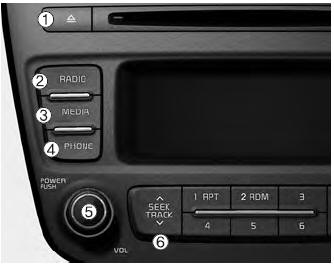
(1)  


(1)  (EJECT)
(EJECT)

Ejects the disc.

(2) Changes to FM/AM/SIRIUS mode.


Changes to FM/AM/SIRIUS mode.

Each time the key is pressed, the mode is changed in order of FM1 ➟ FM2 ➟ AM ➟ SAT1 ➟ SAT2 ➟ SAT3.

❈ In Setup>Display, the radio pop up screen will be displayed when [Mode Pop up] is turned  .
.

When the pop up screen is displayed, use the keys  ~ TUNE knob or
keys    ~
 to select the desired mode. 
to select the desired mode.

(3) Changes to CD, USB(iPod®), AUX, My Music, BT Audio mode.


Changes to CD, USB(iPod®), AUX, My Music, BT Audio mode.

Each time the key is pressed, the mode is changed in order of CD, USB(iPod®), AUX, My Music, BT Audio.

❈ In Setup>Display, the media pop up screen will be displayed when [Mode Pop up] is turned .
.

When the pop up screen is displayed, use the keys  ~ TUNE knob or
keys to select the ~
desired mode. to select the
desired mode.

(4) Operates Phone Screen


Operates Phone Screen

❈ When a phone is not connected, the connection screen is displayed.

(5) PWR/VOL knob

Turns power On/Off by pressing the knob Power :
Turns power On/Off by pressing the knob

Sets volume by turning the knob left/right Volume :
Sets volume by turning the knob left/right

(6) Radio Mode : Automatically searches for broadcast frequencies.


Radio Mode : Automatically searches for broadcast frequencies.

CD, USB, iPod®, My Music modes

- Shortly press the key (under 0.8 seconds): Moves to next or previous song (file)

- Press and hold the key (over 0.8 seconds): Rewinds or fast-forwards the current song.

BT Audio mode : Moves to next or previous song(file)

❈ The Play/Pause feature may operate differently depending on the mobile phone.

(7) Each time the button is shortly pressed (under 0.8 seconds), it sets the screen


Each time the button is shortly pressed (under 0.8 seconds), it sets the screen Off ➟ Screen On ➟ Screen Off

❈ Audio operation is maintained and only the screen will be turned Off. In the screen Off state, press any key to turn the screen On again.

(8) Radio Mode


Radio Mode

- Shortly press the key : Previews each broadcast for 5 seconds each.

- Press and hold the key (over 0.8 seconds): Previews the broadcasts saved in Preset   for 5 ~
 seconds each. for 5
seconds each.

❈ Press the  key again to continue listening to the current frequency.
key again to continue listening to the current frequency.

❈ SAT Radio does not support the Preset scan feature.

CD, USB, My Music mode

 Shortly press the key (under 0.8 seconds): Previews each song (file) for 10 seconds each.

❈ Press the key again to continue listening to the current song (file).
key again to continue listening to the current song (file).

(9) Moves to the Display, Sound, Phone, System setting modes.


Moves to the Display, Sound, Phone, System setting modes.

(10) Displays menus for the current mode.


Displays menus for the current mode.

❈ iPod® List : Move to parent category

(11) knob TUNE
knob

Radio mode : Changes frequency by turning the knob left/right.

CD, USB, iPod®, My Music mode: Searches songs (files) by turning the knob left/right.

❈ When the desired song is displayed, press the knob to play the song.

Moves focus in all selection menus and selects menus.

(12) Radio Mode


Radio Mode

SIRIUS RADIO : Category Search

MP3, CD, USB mode : Folder Search

(13)  ~


(13) (Preset) ~
Radio Mode: Saves frequencies (channels) or receives saved frequencies (channels) (Preset)


Radio Mode: Saves frequencies (channels) or receives saved frequencies (channels)

CD, USB, iPod®, My Music mode

- -  :Random :Repeat


- In the Radio, Media, Setup, and Menu pop up screen, the number menu is selected. :Random


In the Radio, Media, Setup, and Menu pop up screen, the number menu is selected.

System controllers and functions
...
Setup
Display Settings Press the key Select [Display] through TUNE knob or key Select menu through TUNE knob Mode Pop up [Mode Pop up]   Changes selection mode During On state, pr...
See also:

Cowl Top Cover Replacement
1. Remove the cap (A) and remove the nuts, then remove the wiper arm (B). Tightening torque : 22.6 ~ 26.5 N.m(2.3 ~ 2.7 kgf.m, 16.6 ~ ...

How to Delete Digital Key 2 (Smartphone Keys)
To safely delete or revoke smartphone digital key access from your Kia Sorento system memory, launch the vehicle using your primary physical smart key fob. Keep the smart key inside the passenger ...

Door Mood Lamp Installation
1. Install the door mood lamp and connector. 2. Install the front door trim. 3. Connect the negative battery te ...

Copyright © xm.ksmanual.com 2014-2026