
 Kia Sorento: Battery replacement
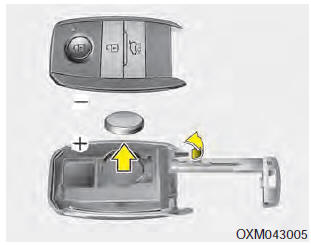
A smart key battery should last for several years, but if the smart key is not working properly, try replacing the battery with a new one. If you are unsure how to use your smart key or replace the battery, contact an authorized Kia dealer.
1. Remove the mechanical key.
2. Pry open the rear cover.
3. Replace the battery with a new battery (CR2032). When replacing the battery, make sure the battery position.
4. Install the battery in the reverse order of removal.
- The smart key is designed to give you years of trouble-free use, however it can malfunction if exposed to moisture or static electricity. If you are unsure how to use or replace the battery, contact an authorized Kia dealer.
- Using the wrong battery can cause the smart key to malfunction. Be sure to use the correct battery.
- To avoid damaging the smart key, don't drop it, get it wet, or expose it to heat or sunlight.

- An inappropriately disposed battery can be harmful to the environment and human health. Dispose the battery according to your local law(s) or regulation.
CAUTION - Smart key damage
Do not drop, get wet or expose the smart key to heat or sunlight, or it will be damaged.
 Smart key precautions
 Theft-alarm system
See also:
Roof Trim Replacement
Sunvisor Replacement
1.
Remove the sunvisor cover (A).
2.
After loosening the mounting screws, then remove the sunvisor
(B) and retaine ...
Inside rearview mirror
Adjust the rearview mirror so that the center view through the rear window is
seen. Make this adjustment before you start driving.
WARNING - Rear visibility
Do not place objects in the rear seat or ...
3. TCM Terminal input/ output signal
Connector [A]
Pin No.
Signal
Condition
Type
Level
29
Sports mode up switch
Up ON
Input
0V/Battery voltage level
...
Manuals list
- Kia Sorento MQ4 2021-2026 Owners Manual
- Kia Sorento XM 2011-2015 Owners Manual
- Kia Sorento XM 2011-2015 Service Manual
