 Kia Sorento: Description
The Vehicle Information System is a Telematics service that ensures comfortable
and enjoyable driving by providing safety, security, and vehicle diagnostic
information, with the option of using your smartphone.
|
The term "Telematics" is a combination of telecommunication and
informatics. The Telematics system uses an assortment of communication
devices mounted on the vehicle to analyze various vehicle and driving
conditions and keep driving safe and convenient.
|
Main Features
| - |
The Telematics system's goals are safety, diagnostics, vehicle
management, and driving support.
|
| - |
eServices via smartphone apps
|
| - |
Features bi-directional communication between UVO2.0/AVN3.0 devices
and smartphones, and between smartphones and the call center. An audio/AVN
head unit is provided and the system supports both smartphone-links
and independent operation.
|
Block Diagram
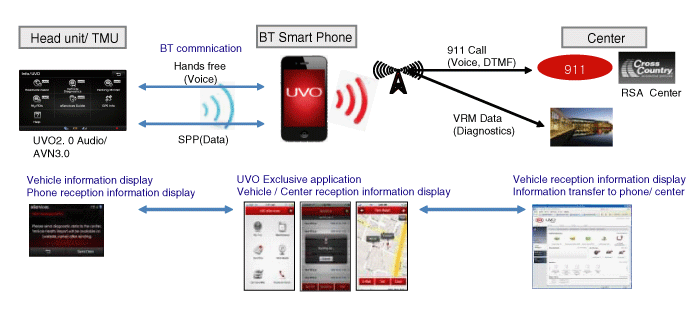
※ SPP (Serial Port Protocol) : Protocol for the smartphone and data
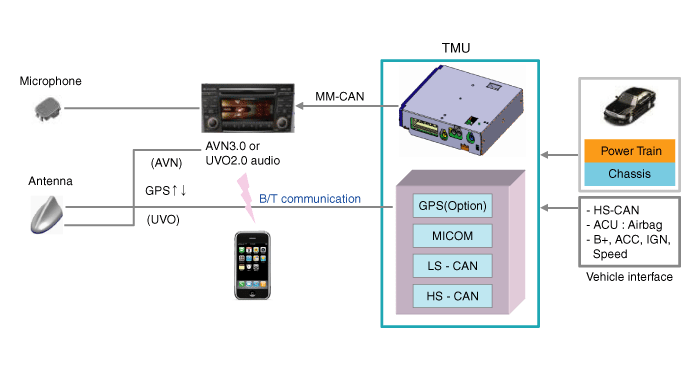
Vehicle Components
Service Lists
No.
|
Service Name
|
Description
|
1
|
Crash Notification Assist
|
The emergency call service automatically contacts the local
emergency call center when the airbag is deployed.
|
2
|
Roadside Assist
|
The emergency dispatch service automatically contacts the KMA
customer center when towing and/or fuel is needed.
|
3
|
Automatic Diagnostics
|
The system can automatically detect failures in PT controllers
and provide tips on troubleshooting.
|
4
|
Vehicle Diagnostics
|
The user can perform vehicle diagnostics at any time.
|
5
|
Scheduled Diagnostics
|
The system informs the user of regular inspection dates and
sends the inspection results to the service center.
|
6
|
eServices Guide
|
An automatic voice guide system provides information on various
Telematics functions to the user.
|
7
|
My POIs
|
Send target destination information from your smartphone to
the system. Your target destinations are saved at www.myuvo.com.
|
8
|
Parking Minder
|
Use your smartphone to find where you parked.
|
9
|
MyUVO
|
Use your smartphone to check your driving patterns, vehicle
diagnostic results, diagnostic history, and part replacement history on
the mobile website.
|
10
|
Maintenance
|
Use your smartphone to manage your mileage-based part replacement
schedule.
|
TMU Dealer Engineering Mode
|
1. |
Function
| A. |
TMU Update : Update TMU unit using update file.
|
| B. |
TMU Factory Default : Clear TMU unit setting and TMU relative
information.
; Registered phone info, Acitvation status, Reset password,
911 Setting default (default is "OFF"), Alert history, My POI
list, Service data, Diagnostic data, Driving information
|
| C. |
TMU Version Information : Check TMU version.
|
|
|
2. |
Access Dealer Engineering Mode in Head Unit (Hidden Menu) (in
the order as below)
|
(1) |
Audio type
| A. |
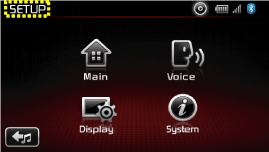
Press SETUP key.
|
| B. |
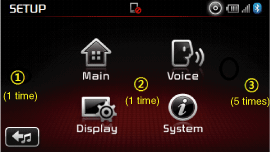
Click the audio screen in order.
; Click  position one
time → Click position one
time → Click  position one time
→ Click position one time
→ Click  postion 5 times postion 5 times
|
IF you click other position, you should
go another screen and then try again.
|
|
| C. |
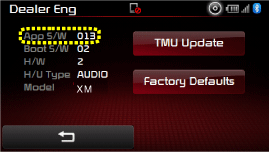
Enter Dealer Eng Mode and check TMU veresion.
|
| D. |
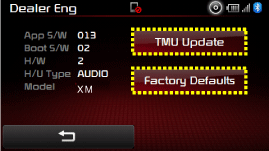
Press "TMU Update" or "Factory Defaults" button
on head unit.
|
1. Telematics unit (TMU)
2. Roof Antenna (GPS)
3. AUX jack
4. AVN head unit
5. Mic...
Connector Pin Specification
No.
Pin Name
Type
From
To
Description (Wiring Spec.)
1
GND
DC Ground
TMU
Battery
...
Copyright © xm.ksmanual.com 2014-2026 - 0.0382
| | | |



 Components
 Telemetics Unit (TMU) Component
